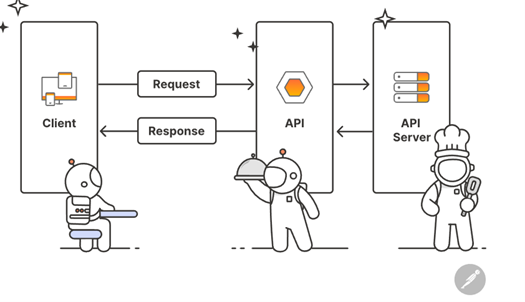
在FastAPI中,响应模型(Response Model)用于精确控制API返回的数据结构和文档生成,通过Pydantic模型实现数据过滤、格式转换和安全防护。
响应模型的作用
- 数据过滤:仅返回模型中定义的字段,隐藏敏感或不必要的数据。
- 数据验证:确保响应数据符合模型定义的类型和约束。
- 文档生成:自动在Swagger UI中展示响应结构。
- 序列化:将复杂数据类型(如ORM对象)转换为JSON兼容格式。
基础响应控制
基本用法
通过 response_model 参数指定响应模型。
示例:基本响应模型
from fastapi import FastAPI
from pydantic import BaseModel

app = FastAPI()

# 请求体模型(输入)
class ItemInput(BaseModel):
    name: str
    price: float
    tax: float = 10.0

# 响应模型(输出)
class ItemOutput(BaseModel):
    name: str
    price: float

@app.post("/items/", response_model=ItemOutput)
def create_item(item: ItemInput):
    # 返回的数据会自动过滤掉未在ItemOutput中定义的字段(如tax)
    return item
效果:
- 输入数据包含name、price、tax,但响应中仅返回 name 和 price。
- Swagger UI中会显示响应结构为ItemOutput。
自动文档生成
class ItemResponse(BaseModel):
    id: int
    name: str = Field(example="MacBook Pro")
    price: float = Field(description="人民币价格", gt=0)

@app.get("/items/{id}", response_model=ItemResponse)
async def get_item(id: int):
    ...
- Swagger效果:自动显示字段示例和描述
响应状态码
FastAPI允许你灵活地控制HTTP状态码,用于明确表示API请求的结果(如成功、错误、重定向等)。以下是状态码的详细说明和用法:
默认状态码
FastAPI根据HTTP方法自动设置默认状态码:
- GET: 200 OK
- POST: 201 Created
- PUT: 200 OK
- DELETE: 204 No Content
示例:显式指定默认状态码
from fastapi import FastAPI

app = FastAPI()

@app.post("/items/", status_code=201) # 显式设置201
def create_item():
    return {"message": "Item created"}
常用HTTP状态码
| 状态码 | 名称 | 适用场景 |
| 200 | OK | 通用成功响应(如GET或PUT成功)。 |
| 201 | Created | 资源创建成功(如POST创建新数据)。 |
| 204 | No Content | 成功但无返回内容(如DELETE成功)。 |
| 400 | Bad Request | 客户端请求错误(如参数校验失败)。 |
| 401 | Unauthorized | 未认证(如未提供Token)。 |
| 403 | Forbidden | 无权限访问资源(如用户角色不符)。 |
| 404 | Not Found | 资源不存在(如请求的ID在数据库中未找到)。 |
| 422 | Unprocessable Entity | 请求体或参数格式正确但语义错误(由Pydantic自动触发)。 |
| 500 | Internal Server Error | 服务器内部错误(如未捕获的异常)。 |
动态设置状态码
在路由处理函数中,可以通过返回 Response 子类(如 JSONResponse)动态设置状态码。
示例:根据条件返回不同状态码
from fastapi import FastAPI, status
from fastapi.responses import JSONResponse

app = FastAPI()

@app.post("/items/")
def create_item(item_id: int):
    if item_id < 1:
        return JSONResponse(
            status_code=status.HTTP_400_BAD_REQUEST,
            content={"message": "Item ID必须大于0"}
        )
    return {"item_id": item_id}
使用 HTTPException 抛出错误状态码
通过抛出 HTTPException 快速返回错误状态码和详细信息。
示例:资源未找到时返回404
from fastapi import FastAPI, HTTPException

app = FastAPI()

items = {"1": "Apple", "2": "Banana"}

@app.get("/items/{item_id}")
def read_item(item_id: str):
    if item_id not in items:
        raise HTTPException(
            status_code=404,
            detail="Item not found",
            headers={"X-Error": "Invalid ID"} # 可选自定义响应头
        )
    return {"item": items[item_id]}
自定义状态码与响应模型
结合 responses 参数,为不同状态码指定响应模型(在Swagger UI中展示)。
示例:定义成功和错误响应
from fastapi import FastAPI, HTTPException
from pydantic import BaseModel

app = FastAPI()

class Item(BaseModel):
    name: str

class ErrorMessage(BaseModel):
    code: int
    message: str

@app.post("/items/", responses={
    201: {"model": Item, "description": "成功创建"},
    400: {"model": ErrorMessage, "description": "无效输入"}
})
def create_item(item: Item):
    if item.name == "invalid":
        raise HTTPException(status_code=400, detail={"code": 400, "message": "名称无效"})
    return item
状态码工具类
FastAPI 提供 status 模块,包含预定义的状态码常量,避免手动记忆数字。
示例:使用 status 模块
from fastapi import FastAPI, status

app = FastAPI()

@app.post("/items/", status_code=status.HTTP_201_CREATED)
def create_item():
    return {"message": "Item created"}
重定向状态码
使用 RedirectResponse 实现 3xx 重定向。
示例:永久重定向(301)
from fastapi import FastAPI
from fastapi.responses import RedirectResponse

app = FastAPI()

@app.get("/old-url")
def redirect():
    return RedirectResponse(url="/new-url", status_code=301)
状态码最佳实践
- 语义化:选择符合操作结果的状态码(如 201 用于资源创建)。
- 一致性:相同类型的操作使用相同状态码(如所有 POST 创建返回 201)。
- 错误处理:
- 客户端错误使用 4xx(如 400 参数错误,404 资源不存在)。
- 服务端错误使用 5xx(如 500 未捕获异常)。
- 文档化:通过 responses 参数在 Swagger UI 中明确展示可能的状态码。
高级响应策略
多状态码响应模型
结合 status_code 参数,定义不同状态码对应的响应模型。
from fastapi.responses import JSONResponse

@app.get("/secret-data/",
response_model=SecretData,
responses={
    200: {"model": SecretData, "description": "成功获取"},
    403: {"model": ErrorMsg, "content": {"text/plain": {"example": "无权限访问"}}}
}
)
async def get_secret():
    if not has_permission():
        return JSONResponse(
            status_code=403,
            content={"error": "无权限访问"}
        )
    return SecretData(...)
动态字段过滤
@app.get("/users/me",
response_model=UserResponse,
response_model_include={"username", "email"},
response_model_exclude_unset=True
)
async def get_current_user():
    ...
- 请求结果:仅返回指定的 username 和 email 字段
自定义响应模型配置
通过 Pydantic 的 Config 类自定义模型行为。
示例:自动转换字段名
class User(BaseModel):
    name: str
    created_at: datetime

    class Config:
        json_encoders = {
            datetime: lambda dt: dt.isoformat() # 自定义 datetime 序列化
        }
        allow_population_by_field_name = True # 允许通过别名访问字段
响应序列化
FastAPI 的 响应序列化(Response Serialization) 是将 Python 对象转换为客户端可接收的格式(如 JSON)的过程。通过 Pydantic 模型 和 FastAPI 的内置机制,可以灵活控制响应数据的结构和格式。
FastAPI 的序列化流程:
- 模型转换:将 Python 对象(如 Pydantic 模型、ORM 对象)转换为字典。
- 字段过滤:根据响应模型(response_model)排除未定义的字段。
- JSON 序列化:将字典转换为 JSON 字符串(使用 dumps)。
- 编码处理:处理特殊类型(如 datetime、UUID)。
处理复杂数据类型
日期时间序列化
Pydantic 自动将 datetime 转换为 ISO 格式字符串:
from datetime import datetime

class Post(BaseModel):
    title: str
    created_at: datetime

@app.get("/posts/", response_model=Post)
def get_post():
    return {"title": "Hello", "created_at": datetime.now()}
- 响应:{“title”: “Hello”, “created_at”: “2023-09-01T12:34:56.789Z”}
自定义 JSON 编码器
通过 json_encoders 处理特殊类型(如自定义类):
from pydantic import BaseModel

class CustomObject:
    def __init__(self, value: str):
        self.value = value

class Item(BaseModel):
    obj: CustomObject

    class Config:
        json_encoders = {
            CustomObject: lambda v: {"value": v.value} # 自定义序列化逻辑
        }

@app.get("/items/", response_model=Item)
def get_item():
    return Item(obj=CustomObject("test"))
- 响应:{“obj”: {“value”: “test”}}
分页响应模型
class PaginatedResponse(BaseModel):
    data: list[User]
    total: int
    page: int

@app.get("/users/list", response_model=PaginatedResponse)
def list_users(page: int = 1):
    users = [{"name": "Alice"}, {"name": "Bob"}]
    return {"data": users, "total": 2, "page": page}
响应序列化配置
通过 Pydantic 的 Config 类自定义模型行为:
class User(BaseModel):
    name: str
    age: int

    class Config:
        json_schema_extra = {
            "example": {
                "name": "Alice",
                "age": 30
            }
        }
        allow_population_by_field_name = True  # 允许通过别名填充字段
常见问题与解决方案
| 问题 | 解决方案 |
| 敏感字段泄露 | 使用 response_model 排除字段 |
| 日期时间格式不一致 | 自定义 json_encoders 或使用 datetime.isoformat() |
| ORM 对象无法序列化 | 启用 orm_mode=True |
| 循环引用导致序列化失败 | 使用 jsonable_encoder 或重构模型 |
| 性能瓶颈 | 避免深度嵌套模型,使用 response_model_by_alias=False |
安全防护机制
敏感数据过滤
class SafeUserResponse(BaseModel):
    id: int
    username: str
    # 不包含 password 字段

class UserDB(BaseModel):
    id: int
    username: str
    password_hash: str

@app.post("/login/", response_model=SafeUserResponse)
async def login():
    user = UserDB(...)  # 包含敏感字段的数据库对象
    return user  # 自动过滤 password_hash
深度嵌套过滤
响应模型可以嵌套其他模型,处理复杂数据结构。
示例:嵌套响应模型
class Address(BaseModel):
    city: str
    street: str

class UserWithAddress(BaseModel):
    name: str
    address: Address

@app.get("/users/{user_id}", response_model=UserWithAddress)
def get_user(user_id: int):
    return {
        "name": "Alice",
        "address": {
            "city": "Beijing",
            "street": "长安街"
        }
    }
性能优化技巧
使用 response_model_by_alias
禁用别名处理以加速序列化:
@app.get("/items/", response_model=Item, response_model_by_alias=False)
def get_item():
    return Item(name="Apple")
预序列化数据
直接返回字典或 Pydantic 模型实例,避免多次转换:
@app.get("/items/")
def get_item() -> dict:  # 直接返回字典
    return {"name": "Apple", "price": 10.0}
ORM 模式加速
当从数据库(如 SQLAlchemy)返回 ORM 对象时,需通过响应模型将其转换为 Pydantic 模型。
示例:ORM 到 Pydantic 的转换
from sqlalchemy import Column, Integer, String
from sqlalchemy.orm import declarative_base
from pydantic import BaseModel

Base = declarative_base()

# SQLAlchemy 模型
class UserDB(Base):
    __tablename__ = "users"
    id = Column(Integer, primary_key=True)
    name = Column(String)
    hashed_password = Column(String)  # 敏感字段,不应返回

# Pydantic 响应模型
class UserOut(BaseModel):
    id: int
    name: str

    class Config:
        orm_mode = True  # 允许从 ORM 对象转换

@app.get("/users/{user_id}", response_model=UserOut)
def get_user(user_id: int):
    user = session.query(UserDB).filter(UserDB.id == user_id).first()
    return user  # 自动过滤 hashed_password 字段
关键点:
- orm_mode=True 允许 Pydantic 模型从 ORM 对象读取数据。
- 响应模型仅包含 id 和 name,隐藏了 hashed_password。
响应缓存
from fastapi_cache.decorator import cache

@app.get("/products/", response_model=list[ProductResponse])
@cache(expire=60)  # 缓存 60 秒
async def get_products():
    ...
处理循环引用
使用 jsonable_encoder 手动处理复杂对象:
from fastapi.encoders import jsonable_encoder

class User(BaseModel):
    name: str
    friends: list["User"] = []  # 循环引用

User.update_forward_refs()  # 解决前向引用

@app.get("/users/")
def get_user():
    user = User(name="Alice")
    user.friends.append(User(name="Bob"))
    return jsonable_encoder(user)  # 手动序列化
复杂场景处理
条件响应模型
一个接口可以根据条件返回不同的模型(如不同用户角色返回不同字段)。
示例:联合类型(Union)
from typing import Union
from pydantic import BaseModel

class AdminUser(BaseModel):
    name: str
    role: str = "admin"
    permissions: list[str]

class NormalUser(BaseModel):
    name: str
    role: str = "user"

@app.get("/users/{user_id}", response_model=Union[AdminUser, NormalUser])
def get_user(user_id: int):
    if user_id == 1:
        return AdminUser(name="Alice", permissions=["read", "write"])
    else:
        return NormalUser(name="Bob")
效果:
- 用户1返回AdminUser 结构,其他用户返回 NormalUser。
- SwaggerUI会展示两种可能的响应模型。
文件流响应
from fastapi.responses import StreamingResponse

@app.get("/download/{filename}",
responses={
200: {
"content": {"application/octet-stream": {}},
"description": "文件下载"
}
}
)
async def download_file(filename: str):
    def iter_file():
        with open(f"storage/{filename}", "rb") as f:
            yield from f

    return StreamingResponse(iter_file(), media_type="application/octet-stream")
最佳实践总结
分层设计模型
| 模型类型 | 用途 | 示例 |
| InputModel | 接收请求数据 | UserCreate |
| DatabaseModel | 数据库交互模型 | UserDB |
| ResponseModel | 控制输出数据 | UserResponse |
| UpdateModel | 部分更新专用(Optional 字段) | UserUpdate |
安全规范
class StrictResponse(BaseModel):
    class Config:
        extra = "forbid"  #禁止额外字段
        anystr_strip_whitespace = True  #自动去除空格
        json_encoders = {
            datetime: lambda v: v.isoformat()  #统一时间格式
        }
文档增强
class OpenAPIExample:
    """集中管理响应示例"""
    USER_EXAMPLE = {
        "application/json": {
            "example": {
                "id": 1,
                "username": "fastapi-user",
                "email": "user@example.com"
            }
        }
    }

@app.get("/users/{id}",
    response_model=UserResponse,
    responses={200: OpenAPIExample.USER_EXAMPLE}
)
async def get_user(id: int):
    ...
通过合理使用响应模型,开发者可以实现:
- 数据脱敏:自动过滤数据库中的敏感字段
- 文档一致性:保证Swagger文档与实际返回数据结构一致
- 性能优化:通过ORM模式减少数据转换开销
- 灵活控制:动态决定返回字段和数据结构
结合请求验证和路由依赖注入,可构建出安全、高效且易维护的API服务。